
Rollov DocsWrite and remember
People
A page for each person you know, with what to ask next time, follow-ups, keeping in touch, memos and met logs, dates, occasions and the ledger, and finding people by any name.
On this page
A page for each person
People keeps the people in your life, each on a page of their own: their name and photo, company and title, phone numbers, emails, address, website, relationship (friend, family, colleague and so on), groups and accounts elsewhere, with an About text for anything else.
Add someone with the + button on the People page: by hand, from a business card photo, from your phone's contacts, or by importing a contacts file. Typing @ in any text mentions a person, and mentioning a name nobody has yet can add them.
A person's page shows everything that mentions them, so a meeting note, a task or a memo about them is one tap away.
People you added lately show above the list under Recently added, five at most, each with how long ago you added them (today, yesterday, 3 days ago). They stay there for a week; Settings › People › Recently added makes it 1, 3, 14 or 30 days, or turns it off. The row shows while the list is sorted by name and nothing narrows it.
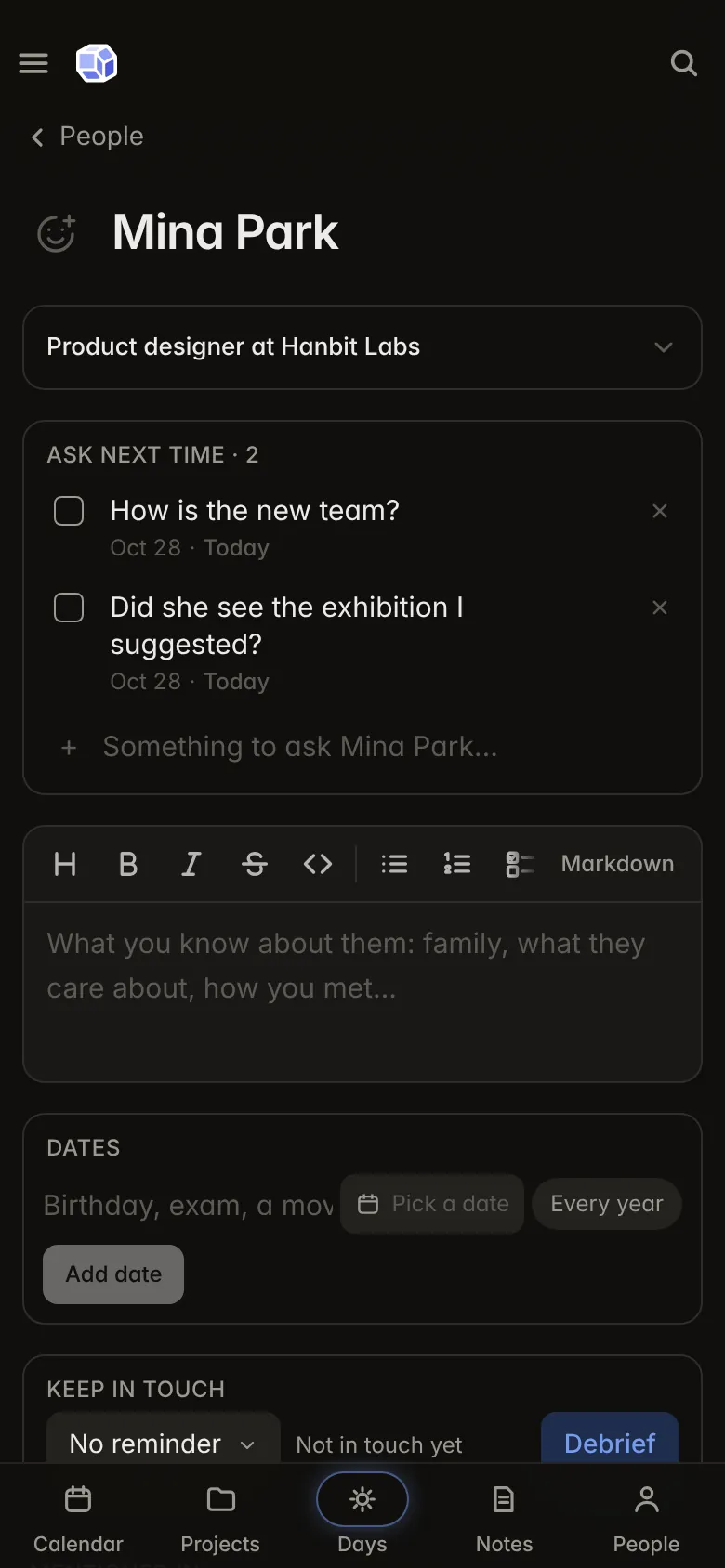
Ask next time
Ask next time keeps questions for the next time you see someone: how the new job is going, whether they saw the exhibition. They wait on the person rather than on your days, so they never roll over, and today's follow-ups bring the first one up when it is time to get in touch.
Follow-ups
A follow-up is getting back to someone by a day: the text, call or message after meeting them. It lives in their Contact section with what it is about and its day.
- Someone you add from the app gets a follow-up a few days later (3 by default; Settings › People changes it, or turns it off).
- Today's page has Follow up today, the late ones first, with what to bring up (their newest memo and the first question you saved), Call, Text and Email buttons, Later and Done.
- Each open follow-up reminds you by push on its day, at your daily reminder time.
- A day ahead shows the follow-ups due on it, and the calendar marks the day.
Several in one line
In today's add sheet, type @ and a name to make follow-ups instead of a task. Each @name gets one about the words after it, and words before the first @ are shared by all, with their date: "Event 11/12 @Minah send the email @Andre text back" makes two follow-ups due on November 12. The sheet shows what it will make before you add them, and Add as a task keeps the line as a plain task. A name nobody has yet adds that person.
A follow-up can also say How: Call, Text, Email or Message, read from words like "call" or "email" in the line, or picked on the person's page. Today's card then puts that way first, fills an email's subject with what it is about, and chips at its top show one channel at a time, so all the emails can be done in one go.
For an event or project
Start the line with an event's or project's name, and its follow-ups are for it: "EEF dinner @Minah send the photos @Andre text back" ties both to your EEF dinner and, with no date of their own, makes them due the day before it. The sheet shows For EEF dinner with an × to leave it out. Each follow-up then shows a chip that opens the event or project, and the event's page and the project's overview list who you still owe a reply.
From a calendar block
If you jot who to get back to in a calendar block ("EEF – 11/12 mail first / Andre reply on KakaoTalk"), open it and tap Make follow-ups. Today's add sheet opens with the block as a follow-up line, an @ before each person you know, so you can check it, add @ to anyone it missed and add them all at once. It works for events from Google and your other calendars too.
Keeping in touch
Set how often you want to be in touch with someone, from every week to once a year, in their Contact section. Being in touch counts a day you met, a memo, or a follow-up done; In touch today records a call or a text.
When it has been too long, today's Keep in touch card lists them with how late it is and one-tap ways to reach them. The same card shows people's birthdays and other dates in the coming week, with Remind me. The People page lists everyone past their time as Drifting.
Met logs and memos
- A met log records that you met people on a day, at a calendar event or not. Met today on a person, Log people met from the People page's + button, or the event panel once an event has begun, makes one. A log not at an event has its own title, times, place and description.
- A memo keeps what you talked about, what you learned, dates to remember, what you promised, what to bring up next time and anything else. Debrief on a met log starts a memo tied to it.
The People page's Met logs and Memos tabs list every log and memo by month, with a search. Memos and met logs stay private to People: they are not in search, the graph or your notes. Day pages show who you met that day under People today, folded and behind the app lock by default.
Contact from the calendar
Today's page can suggest who you were with at the past week's events, from the guests on your calendars and the names in event titles ("Lunch with Mina"). Log contact puts them on a met log and ticks off their plain follow-ups; Not now turns an event down. Settings › People › Contact from your calendar chooses between suggesting (the default), logging the sure ones by itself, or off.
Dates
A person's dates (birthdays, anniversaries, weddings, work anniversaries, memorials and your own) show on their page with how soon each comes and the age or years it marks, and on the calendar's day. With lunar dates on (see Holidays and lunar dates), a yearly date can follow the lunar calendar. The day after a date you mark for a follow-up, Rollov reminds you to ask how it went.
Occasions and the ledger
- Occasions are the weddings, funerals, first birthdays, housewarmings and parties people host. Each has its day, whether you went, its hosts, its place and what happened. A wedding can become the hosts' anniversary.
- Given & received on a person is a ledger of what you and they have given each other or owe: money (such as 경조사비 at a wedding or a funeral), gifts, favours or information. It totals money per currency, given, received and still owed each way, and Paid back settles what was owed.
The People page's Occasions tab lists every occasion by month with what you gave there.
Finding people by any name
People are found by the names they actually go by: their given name alone, a nickname, the start of a name, 초성 (ㅂㅁㅇ for 박민아), another spelling or romanization (Minah for 민아), a common nickname (Mike for Michael), or a name with a title or honorific (민아씨, 김대리님). Add other names, such as a spelling in another language or a maiden name, under Also known as.
When two people share a name, suggestions show each one's title and company, or their number or email when there is no company, so you pick the right one. When you add people to an event or a met log, each suggestion shows the whole name with these details on a line below, and someone from your phone's contacts shows From phone with their number or email.
Business cards and notes about people
With the AI switches on:
- Scan a business card reads the front and back of a card and shows what it found to check before anything is saved. It can add someone new or fill in someone you know.
- Notes about people lets you write or dictate who you met and what was said. Claude sorts it into people, meetings, memos, follow-ups and dates, as a draft you review and change before saving.
Both are off for accounts with end-to-end encryption. See AI features.
Phone contacts and contact files
- In the Android and iOS apps, From phone reads your address book into a list of its own. Nothing goes into People until you pick it, and the list stays on the phone. People already in Rollov are marked, and Fill in adds only what they lack. Phone contacts at the top of the People page opens that list any time, with how many are not added yet and a dot while someone is new.
- Import contacts reads vCard files and Google or Outlook CSV exports. Cards for the same person become one, and importing the same file twice changes nothing.
- Export writes your people as a vCard or a Google CSV, from the same sheet or Settings › Import & export.
Groups and colours
Groups are your own: a team, a club, a trip. Give each a colour, and a dot after the name shows a person's first group. Make groups on a person's page or in Settings › People. The People list filters by relationship, group and colour.
Still stuck?
Write to support@rollov.app with what happened and which device you were on. Questions, bugs and ideas are all welcome.
In the app: Settings › Help has the guided tour and a walkthrough for each part.